Pan Setup
In the Pan Setup dialog box, you can define even more advanced settings for the Surround Editor. The dialog window can be opened by clicking on Pan Setup in the Surround Editor or by right-clicking on the sound source.
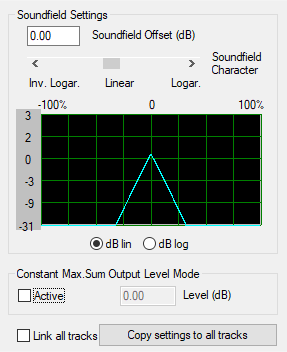
Soundfield offset (dB): If sound sources are positioned directly on a single surround channel, the offset set here is taken into account. Thus, for example, individual compensation can be made if such signals are too prominent.
Soundfield Character (only in Sound field or Angle mode): The level drop characteristic of the sound field can be adjusted continuously. Inv. logar. produces a quick drop of the sound field and short fades between loudspeakers. Logarithmic provides a slow reduction of the sound field and longer transitions between speakers.
Constant max. sum output level mode: If this option is activated, the maximum level of all channel outputs of the Surround Panorama Module will not exceed the set value. Unintended fluctuations of the overall level during position changes can thus be compensated. The function is especially useful when you want to move specific sources around the room via automation.
Link all tracks: The following settings within the Surround Editor are applied to all tracks of the arranger and changes are always executed in sync on all tracks: Sound Field Offset, Level Drop Characteristic, Sum Output Volume, Center, Pan Law/Width, LFE Level and Settings, Channel Settings like Level Change or Mute.
Copy settings to all tracks: The settings made in this Sound Panorama Module (sound field offset, level drop characteristics, output volume sum constant, center, pan-law/width, LFE level and settings, channel settings such as level changes or mute) are copied to all other tracks once.